
Turtlebot_Teleop not Working Properly

We are having trouble getting turtlebot_teleop node to work.
After we ssh into the turtlebot and roslaunch turtlebot_teleop keyboard_teleop.launch the program begins working, but when we press the keys, the turtlebot does not respond. It displays changes in velocity, so we know that it is registering our key presses, but the robot remains stationary.
We even borrowed another turtlebot from someone else working in the lab to make sure it wasn't our robot, but could not get it to work on his either.
Log File:
[rospy.client][INFO] 2012-03-21 11:15:15,572: init_node, name[/turtlebot_teleop_keyboard], pid[9624]
[xmlrpc][INFO] 2012-03-21 11:15:15,573: XML-RPC server binding to 0.0.0.0
[xmlrpc][INFO] 2012-03-21 11:15:15,575: Started XML-RPC server [http://192.168.1.101:42373/]
[rospy.init][INFO] 2012-03-21 11:15:15,575: ROS Slave URI: [http://192.168.1.101:42373/]
[rospy.impl.masterslave][INFO] 2012-03-21 11:15:15,576: _ready: http://192.168.1.101:42373/
[rospy.registration][INFO] 2012-03-21 11:15:15,580: Registering with master node http://192.168.1.101:11311
[xmlrpc][INFO] 2012-03-21 11:15:15,580: xml rpc node: starting XML-RPC server
[rospy.registration][INFO] 2012-03-21 11:15:15,581: Registering publisher topic [/cmd_vel] type [geometry_msgs/Twist] with master
[rospy.init][INFO] 2012-03-21 11:15:15,677: registered with master
[rospy.rosout][INFO] 2012-03-21 11:15:15,808: initializing /rosout core topic
[rospy.rosout][INFO] 2012-03-21 11:15:15,814: connected to core topic /rosout
[rospy.simtime][INFO] 2012-03-21 11:15:15,821: /use_sim_time is not set, will not subscribe to simulated time [/clock] topic
[rospy.core][INFO] 2012-03-21 11:15:55,983: signal_shutdown [atexit]
[rospy.impl.masterslave][INFO] 2012-03-21 11:15:55,995: atexit
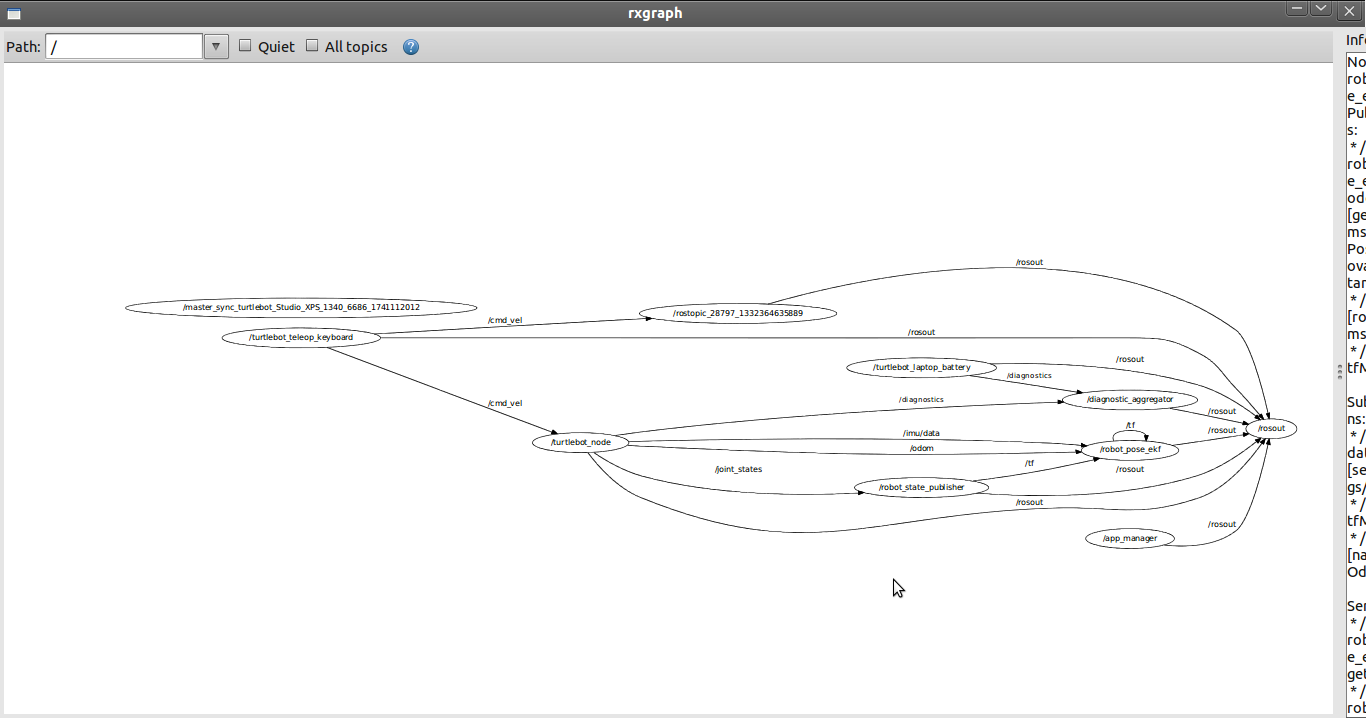
When I echo /cmd_vel it displays linear and angular coordinates, so the information is definitely being published, but when I look at the rxgraph of everything, the /turtlebot_teleop_keyboard is only linked to /rosout.
Shouldn't it also be communicating with something else in order to send its messages to the robot?
Karthik,
I will try this out later today and let you know how it goes. Thank you again for your help!
March 26 Update
I tested all the network connections and everything is fine, but turtlesim is not installed on the laptop, so I could not test that.
So I believe my problem stems from the nodes not correctly publishing or subscribing. In my rxgraph, the turtlebot_teleop_keyboard node is publishing a cmd_vel topic but the turtlebot_node is not subscribing to it. When I click on the turtlebot_node it says "Subscriptions: none". When I do rosnode info turtlebot_node it says
Subscriptions:
 * /turtlebot_node/cmd_vel [unknown type]
so it looks like there is conflicting info. I am unsure what to do to fix this.
March 28
So I found this post which might explain some of the problem: here
but I followed the proposed solutions and it still does not work.
I downloaded Brown university's teleop package - teleop_twist_keyboard and it almost mimics the ...




Please provide more information. We cannot help you unless you provide information on how to reproduce your error.
One thing to check is that the TurtleBot dashboard is working and that you are communicating with the Create. http://www.ros.org/wiki/turtlebot_dashboard.
There is no real "error", the robot just does not respond to keystrokes. The output on the screen shows that the program is responding to the keystrokes, but the robot itself does not move. It led us to believe it was a problem with our robot, but we tried another robot it would not move either.
The dashboard is working perfectly (everything is green), and we can even visualize things with the kinect in rviz. We were hoping to have some fun with gmapping, but without teleop we have no way to really drive it around. Thank you again for any suggestions.
The /turtlebot_teleop_keyboard is connected to /cmd_vel The details are Type: geometry_msgs/Twist
Publishers: * /turtlebot_teleop_keyboard (http://192.168.1.101:59990/)
Subscribers: None
Type: geometry_msgs/Twist
Publishers: * /turtlebot_teleop_keyboard (http://192.168.1.101:59990/)
Subscribers: None
Ok i have edited my answer witha diagnosing method. Let me know if you find anything
if you run 'rostopic info /cmd_vel' you should see turtlebot_node listed as a subscriber. I would try running minimal.launch manually to see if there is a problem there.